
iBackup/Restore
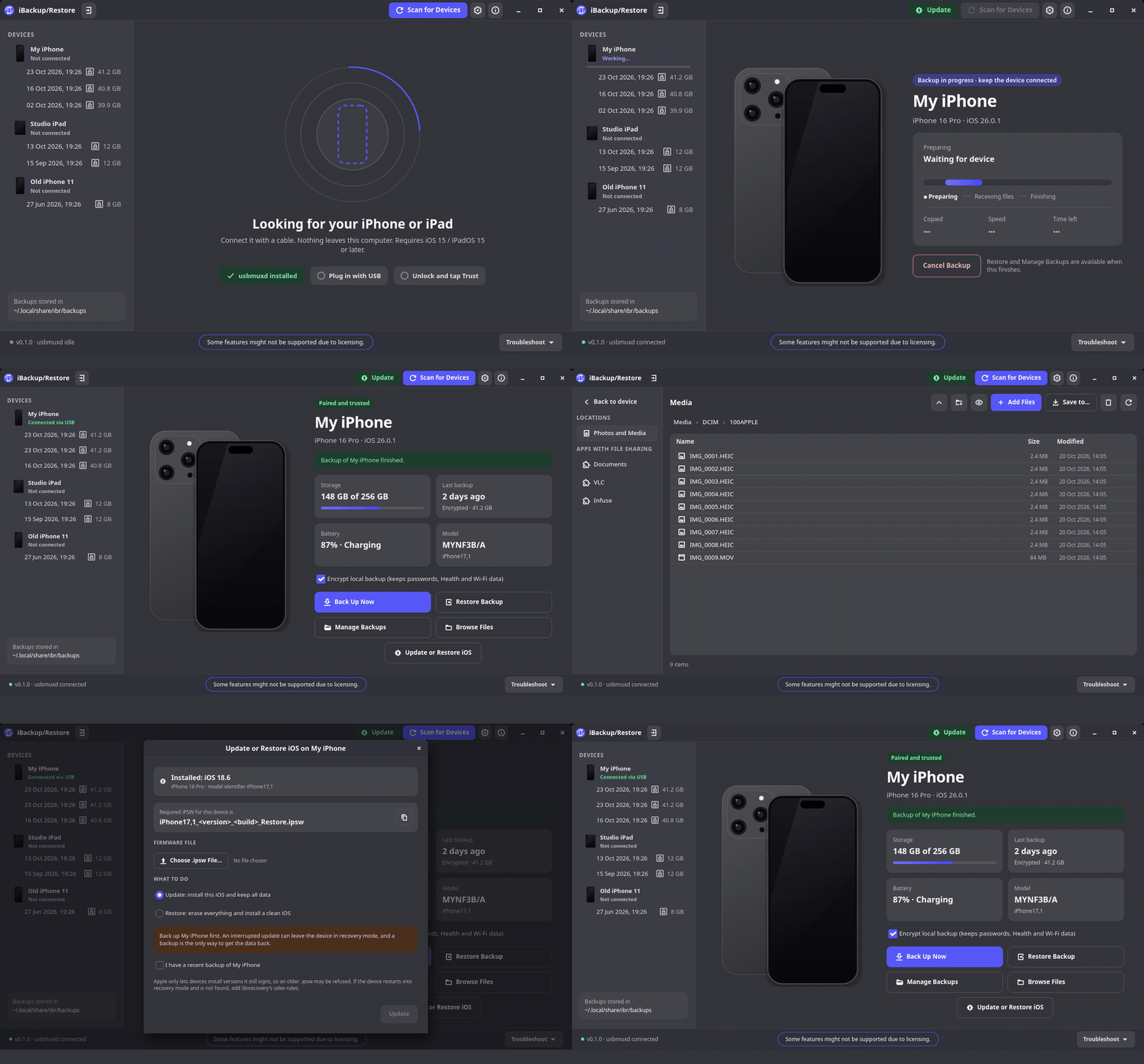
iBackup/Restore is the XeroLinux app for backing up and restoring iPhone and iPad on Linux. Built with Python and GTK4, it wraps the libimobiledevice toolchain in a clean native interface. Full or encrypted backups with real device progress, side-by-side backup history, photo and document browsing with drag and drop, iOS updates and restores from local .ipsw files, and recovery/DFU mode detection - all without touching a terminal.
~ Full feature tour ~
Made Possible Thanks To Claude Max
Features
Section titled “Features”Full and Encrypted Backups
Back up any connected iPhone or iPad with live progress pulled directly from the device. Enable encryption per backup to protect health data and saved passwords.
Backup History
Keeps the last few backups per device side by side. Pick any compatible one to restore from, not just the most recent.
Photo and Document Browser
Browse the camera roll and app documents directly from a backup. Drag and drop files out to your desktop without a full restore.
iOS Updates and Restores
Update or fully restore a device from a local .ipsw file you download yourself. No Apple servers, no account required.
Recovery and DFU Mode
Detects devices stuck in Recovery or DFU mode and walks you through getting them out. Sets up a narrow udev rule once for USB access.
Keyring Integration
Backup passwords saved securely via Secret Service (GNOME Keyring or KWallet). No plaintext passwords stored on disk.
Download
Section titled “Download”One dependency cannot ship inside the AppImage: usbmuxd, the system service that talks to iPhone and iPad over USB. It runs as root and ships udev rules, so it must come from your distribution. iBR will tell you if it is missing.
| Distribution | Command |
|---|---|
| Arch, CachyOS, EndeavourOS, XeroLinux | sudo pacman -S usbmuxd |
| Debian, Ubuntu, Mint, Pop!_OS | sudo apt install usbmuxd |
| Fedora, RHEL, Nobara | sudo dnf install usbmuxd |
| openSUSE | sudo zypper install usbmuxd |
| Void | sudo xbps-install usbmuxd |
| Alpine | sudo apk add usbmuxd |
| Gentoo | sudo emerge app-pda/usbmuxd |
| NixOS | services.usbmuxd.enable = true; in your configuration |
On systemd distributions, usbmuxd starts automatically when a device is plugged in. On others, enable the usbmuxd service with your init system.
Once downloaded, mark it executable and run:
chmod +x iBR-*.AppImage./iBR-*.AppImageThe AppImage bundles Python, GTK4, and all libimobiledevice tools. An Update button appears inside the app when a newer release is available.
Bug reports and feature requests live on GitHub.