Skip to content

🎨 XeroLinux Installer Script 🎨

Project is currently in Beta Stages. Testers Needed !

Info

This script was created for a fresh install. Will format full disk, no manual partioning is offered yet. Also it's to be used only if you know what you are doing, no help/support will be provided. USE AT YOUR OWN RISK ! Both scripts are open source and available on GitHub : Here

Transform your base Arch Linux installation into a fully-featured XeroLinux KDE Plasma desktop with a single command. This script handles everything from package installation to system configuration, giving you a personalized and polished desktop experience.

No compromises. No missing features. Just pure XeroLinux goodness. 🤓

Overview

Can't donate for the ISO? No problem. XeroLinux Installer gives you the complete XeroLinux experience through two simple scripts — transforming vanilla Arch Linux into a fully-configured, beautifully-themed KDE Plasma desktop that's identical to our official ISO.


Why This Exists

XeroLinux has always been about making Arch Linux accessible and beautiful. While our ISO provides the easiest path, we believe everyone deserves access to a polished Linux experience — regardless of their ability to donate.

This project is our way of giving back to the community that made XeroLinux possible.

Two scripts. One command. Full XeroLinux experience.


What You Get

Everything included in the official XeroLinux ISO:

Feature Description
🖥️ KDE Plasma Desktop Complete desktop environment with full Wayland support
🎨 Layan Theme Suite KDE theme, icons, cursors, and color schemes
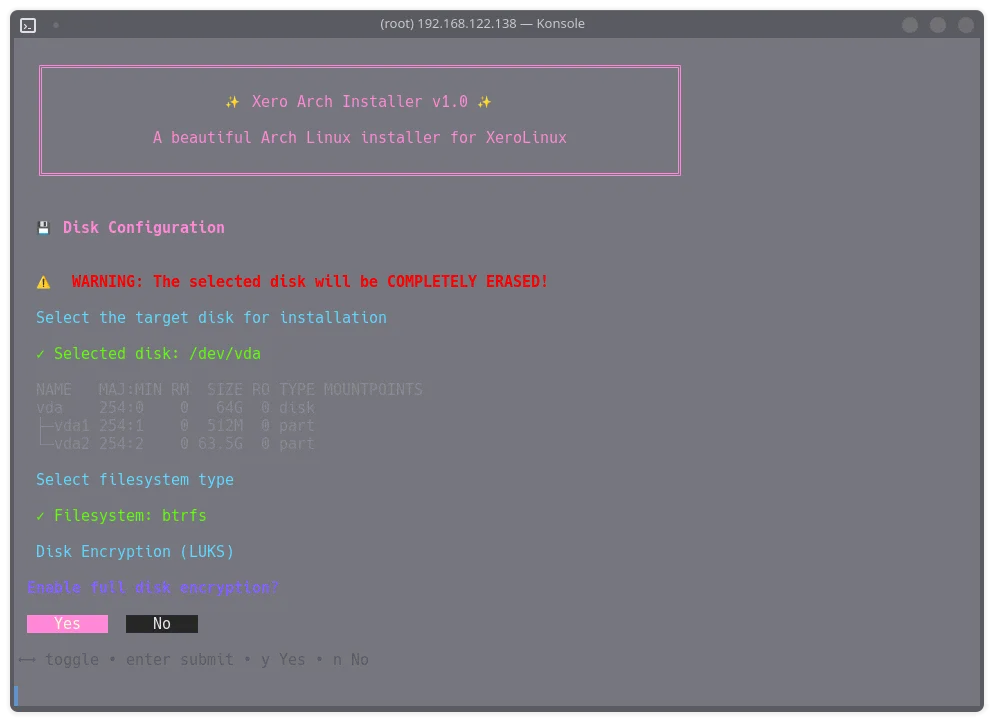
🔐 LUKS Encryption Optional full-disk encryption for your data
🗂️ BTRFS with Snapshots Modern filesystem with automatic snapshot support
🎛️ GPU Auto-Detection Automatic drivers for Intel, AMD, and NVIDIA
🚀 XeroLinux Toolkit Post-install configuration utility
💻 Oh-My-Posh Terminal Beautiful, informative shell prompt
🖼️ Custom GRUB Theme XeroLayan boot screen
Optimized Services Pre-configured for performance
📦 AUR Ready Choice of paru or yay helper

The Two Scripts

Script 1: xero-install.sh

The foundation. This script handles the base Arch Linux installation:

  • Disk Partitioning — Guided setup with encryption options
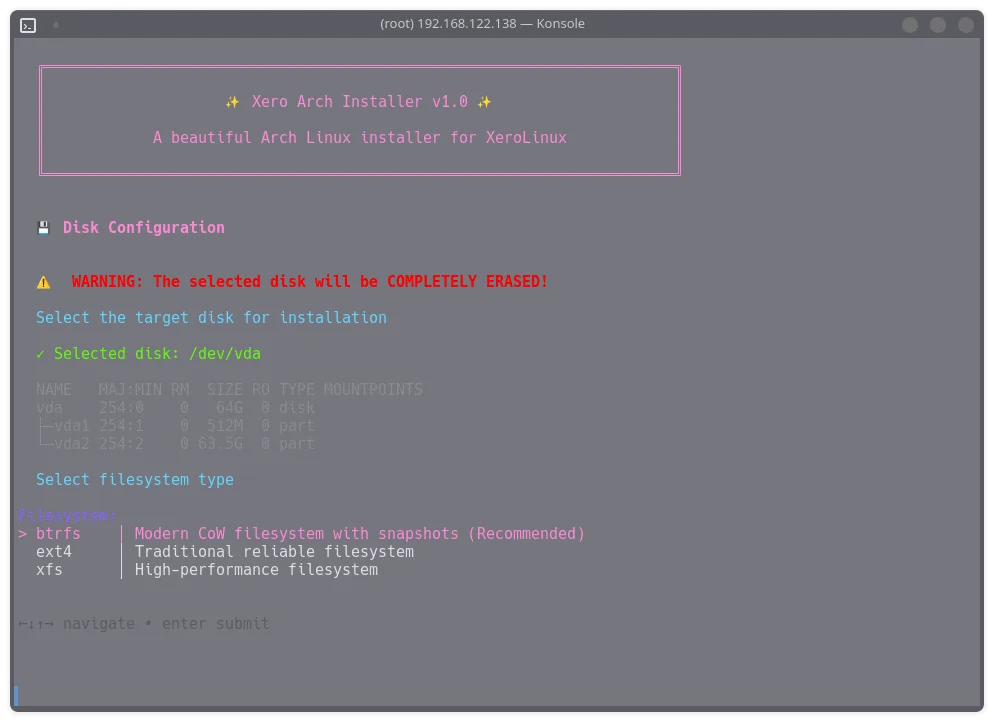
  • Filesystem Selection — BTRFS (recommended), EXT4, or XFS
  • Base System — Core packages, kernel, and bootloader
  • GPU Drivers — Automatic detection and installation
  • Network Setup — NetworkManager and essential connectivity
  • User Creation — Your account with proper permissions

Script 2: xero-kde.sh

The transformation. This script turns base Arch into XeroLinux:

  • KDE Plasma — Full desktop with curated package selection
  • XeroLinux Theming — Complete Layan rice applied
  • Software Selection — 12 categories of optional applications
  • System Configuration — Services, initramfs, GRUB
  • Shell Customization — Oh-My-Posh, Fastfetch, and more

Installation

Quick Start

Boot from any Arch Linux ISO and run:

bash -c "$(curl -fsSL https://xerolinux.xyz/script/xero-install/install.sh)"

That's it. The script guides you through everything else.


Installation Walkthrough

Phase 1: Base System

The installer walks you through:

  1. Keyboard Layout — Select your preferred layout
  2. Disk Selection — Choose installation target
  3. Encryption — Optional LUKS full-disk encryption
  4. Filesystem — BTRFS, EXT4, or XFS
  5. Username & Password — Create your account
  6. GPU Drivers — Automatic or manual selection

Phase 2: Desktop & Software

After rebooting into your new system:

  1. AUR Helper — paru (default) or yay
  2. Web Browser — Floorp, Firefox, Brave, LibreWolf, and more
  3. VPN Client — ExpressVPN, Mozilla VPN, Proton VPN
  4. Communication — Discord, Telegram, Element, and more
  5. Office Suite — LibreOffice with 30+ language options
  6. Development — VSCodium, Hugo, Meld, GitHub Desktop
  7. Creative Apps — GIMP, Krita, Inkscape, Blender
  8. Media Tools — Kdenlive, Spotify, MPV, and more
  9. Virtualization — QEMU/KVM with virt-manager

Skip anything you don't need. Install only what you want.

.// Screenshots \\.


Supported Hardware

GPUs

Vendor Support
Intel Full support (integrated graphics)
AMD Full support (AMDGPU driver)
NVIDIA Full support (proprietary + open kernel modules)
Hybrid Intel/AMD + NVIDIA switchable graphics

Filesystems

Filesystem Features
BTRFS Snapshots, compression, subvolumes (recommended)
EXT4 Traditional, stable, widely supported
XFS High performance, large file support

Encryption

Option Description
LUKS Full-disk encryption with password
None Standard unencrypted installation

Script Vs. ISO

Aspect Scripts ISO
End Result Identical Identical
Installation Method Terminal-guided GUI (Calamares)
Download Size ~2 KB ~3 GB
Requires Donation
Learning Experience Higher Lower

Frequently Asked Questions

Is this really free?

Yes. These scripts are completely free and open source. No donations required, no paywalls, no restrictions.

Is it the same as the ISO?

Yes. You get the exact same packages, themes, and configurations. The only difference is the installation method.

Why would I use this over the ISO?

Several reasons:

  • You can't or prefer not to donate
  • You want a smaller download (scripts vs. 3GB ISO)
  • You want to learn more about Arch installation
  • You have a slow internet connection
  • You want more control over the process

Why would I use the ISO instead?

  • Faster installation with GUI
  • Offline installation capability
  • Less technical knowledge required
  • Support the project financially

Can I use this in a VM?

Yes. The scripts detect virtual environments and install appropriate guest tools (QEMU, VirtualBox, VMware).

What if something goes wrong?

The scripts pause for 3 seconds on any error, letting you see what happened. Most warnings are non-critical and won't stop the installation. If something fails completely, you can check the output and retry.


Requirements

  • Arch Linux ISO — Any recent version
  • Internet Connection — Required throughout installation
  • Storage — 20GB minimum (50GB+ recommended)
  • RAM — 2GB minimum (4GB+ recommended)
  • UEFI System — Legacy BIOS not supported

Support the Project

Using these free scripts? Consider supporting XeroLinux:

  • Star the repos on GitHub
  • 📣 Spread the word — Tell others about XeroLinux
  • 🐛 Report bugs — Help us improve
  • 💝 Donate — If you can, grab the ISO and support development

Join the Community


License

Both scripts are released under the GPL-3.0 License. Use them, modify them, share them — just keep them open source.


Wrapping up

At the end of the day, this is about giving people options. If you enjoy learning, like knowing what’s happening under the hood, and want full control over your system, this installer is for you. It takes a bit more attention than a one click setup, but that’s also where the fun is.

This project is still evolving, and like everything in the Arch world, it’s a journey rather than a finished product. Feedback, testing, and constructive ideas are always welcome. If it helps you get a clean, solid XeroLinux system up and running, then it’s already doing its job.

XeroLinux — Arch Linux, made beautiful. 🤓